Reporter updates
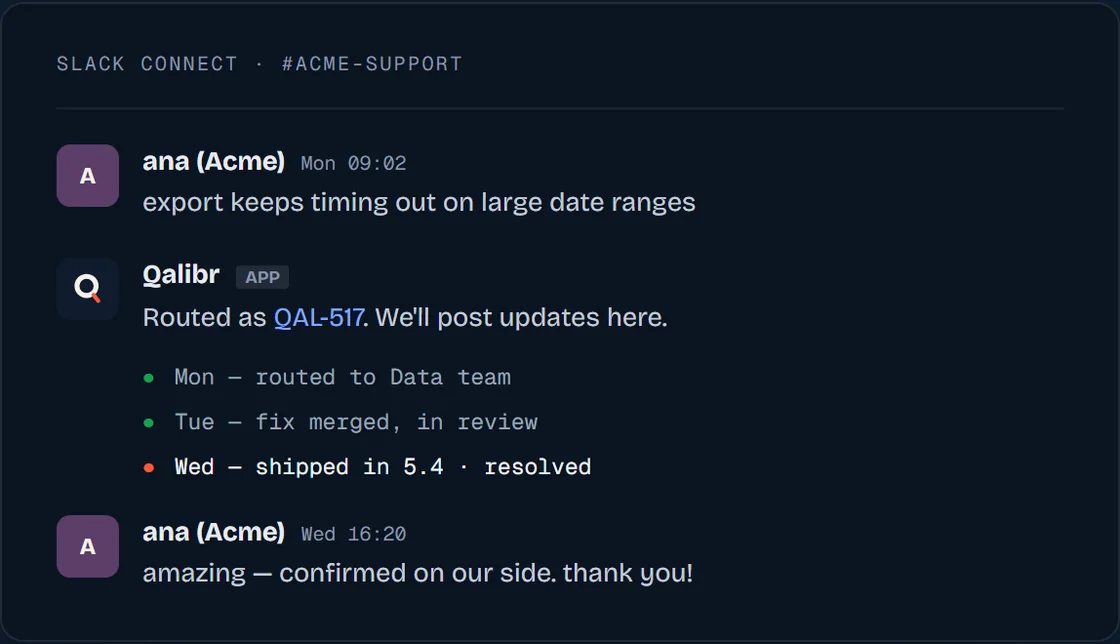
When a Slack report becomes a new ticket, the original thread keeps getting the updates that matter, so whoever reported it is never left wondering. Support and engineering finally share one thread, with no “any update on that bug?” three days later.
What the reporter sees
Qalibr posts one message in the thread and edits it in place as the ticket moves. Not a stream of new messages — the same message, kept current.
It shows the bug’s title, where the ticket stands right now (Filed, In progress, Resolved, Closed), the workflow states it has passed through with the current one marked, and a line carrying the ticket link and its assignee.
When the ticket reaches a finished state, the message says so and stops there. That is the end of the loop: a later reopen does not start it again, and the thread will keep reading Resolved or Closed. Follow the ticket in your tracker from that point.
An update that changes nothing the message displays produces no visible change, so the thread doesn’t churn.
Coming: reporters will validate a fix from a preview link, approve or reject, right in the thread. Today, thread status updates keep the loop closed.
When you get live status — and when you don’t
Live status runs off your tracker pushing state changes to Qalibr. Linear and Jira both do.
Three conditions have to hold:
- The report arrived in Slack. A report you pasted into the dashboard has no thread to update — follow it in the dashboard and in your tracker instead. (A Slack report you approve from the dashboard still gets its thread updates; what matters is where the report came from, not where you decided.)
- It was approved as a new ticket. A report resolved against an existing issue — linked, reopened, or rejected as a duplicate — gets a single message saying what happened, and no ongoing tracking.
- Your tracker’s webhook is live. On Jira this is the one to watch: if the account that connected Jira lacked the Administer Jira permission and the webhook was never set up by hand, there is nothing to push. See Integrations.
When any of those doesn’t hold, Qalibr posts a plain one-off reply naming the ticket it created, and leaves it there.
Other things Qalibr says in a thread
The status message isn’t the only thing that shows up:
- If an approval sits unreviewed for about a day, Qalibr nudges the thread so it doesn’t get lost.
- If processing fails after its retries, Qalibr says so in the thread rather than going quiet.
- Mention
@Qalibragain in a thread it has already resolved and it replies with what happened last time — then triages your new message anyway.